Saturday, 19 July 2014

How to Remove My Pictures from Fake Facebook Profile, Some One misuse My Picture?


HI…Friend’s Today I am discuss about, Someone Using My Pictures in Fake Profile , How to Remove Them? I think every person is using facebook social media. And he/she are post his personal picture are info to his friend’s. But some person are miss used facebook, he Collecting your private information’s and picture are miss used and make fake profile, for harassment purpose. I think you have listened this type of question every day.This type of problem solution solved by Facebook help center.

 
Do You Know How to Report inappropriate or abusive things on facebook.

Send a Message to Person and tell about that Remove this post or contain. Which you don’t like.
You use the report with spam link post or photo to submit a report. (Spam, harassment or others issue).
Unfriendor block the person.
Read the Facebook Community Standard for information about what is and not allowed on facebook.

Some one used My Picture How to remove it:-

If you want remove own picture from some one used for harassment purpose, Visit Image Privacy Rights Section of Facebook Help Center to learn about unauthorized photos and videos and report them.

Help Center provide information about how to repost photos and videos of their privacy rights. When you follow that rule and instruction, that will remove photos and videos that you report as unauthorized.

I think this is help for you. If any type Query or Problem Comment on below.

Like to visit Latest Facebook Tricks:-


How to Create Your Own Smiley/Emoticon for What’s up, WeChat and Others?

In this time so many types of messaging apps are available in Android. Every apps are use common emoticons but we want to create a own emoticons and smiley. Let’s see how to create own smiley or emoticon for what’s app, WeChat and Viber and others messenger.

Smiley DIY

Smiley DIY is a most famous apps for android, help of this apps you create your own smiley or Emoticon for messaging apps. This app is developed by SMeiTi. And it is available for free in Google Play Store.

Let’s See How work this apps?

It is very simple and easy to handle by user, it is integrates in almost all messaging android’s apps.
Lest simple explanation, if are you using Whats up App you are created own smiley or Emoticon to Friend’s whats up app.

How to use these apps?
You have click on the clip icon at top right corner. Then you select or click on the gallery.
After selecting gallery then last open are come to choice DIY icon and click or select it.
See below images for more details.
Now create own emotion and Smiley and share to your friend’s.

It is very simple to use. You can choice your nice faces, mouth are others images. And make any emoticon, and easy to edit text and swipe to figure for swiping.
So many types of effects are available in DIY apps. Change background color, font color, size of pan, shade and more effect’s are available in this apps. It provides so many type of customization option also. You can rotate degree of smiley by rotating your phone.
DIY is interesting fun for user. You can enjoy these apps making your own smiley emoticon.
If you want to download this apps for free Available in Google Play Store.


@@Thanks!! For visit Difftrick. Keep watching android Tips and tricks on Difftricks.

Like to visit Latest Android Tricks:-

Thursday, 17 July 2014

5 Most Famous Apps for Downloading Music on Android or Smartphone

There are so many mobile apps out there. And so many apps for Music’s downloader. And 5 Most famous and great apps for downloading music on android or Smartphone easy and use most amazing feature to editing the song and make a ringtone. We are love listening music on our free time.
Friend you can easily download your favorite music’s for offline playback. These apps available on the Google Play Store that lets you download mp3 songs for free on your Android device.


The Great and most famous Music Download apps Paradise Mp3. This app lets you search and listen to copy left mp3 songs/ music files. You can also search music by Artist and title or composer.


Gtunes Music Download is a simple app for download songs for free.
You easy to save download link and share the friend’s.
Click on the Link and download this best music app from play store.


Tunee music is the best free music app that you can use to download free music. You can search song by title, artist.

Type the song or what you’re looking in Search box.
Click on the Link and download this best music app from play store.
The downloaded music files will be automatically stored on Music folder in your phone’s internal storage.


Another free Mp3 Music Download Pro is Android app for downloading free music from online.
Help of this app you easy to edit any songs and make ringtone. You easy to save download link and share the your friend’s.


5. Download free music application

Download free music app is a very simple music android app extremely easy to use the download free music’s online. Simply typing what you’re looking for in the Search box and you’ll get a list of results.
Type the song or what you’re looking in Search box.
Click on the Like and download this best music app from play store.


@@Thanks, Keep watching Android posts in Difftrick.!!

Tuesday, 15 July 2014

Top 12 Google Tricks and Easter Eggs for entertainment

Google Easter Eggs is popular amazing features that Google have introduced to fun for users. It is developed by Google team. Many developers leave behind something know as Easter Eggs in the Google that develop. An Easter Eggs is a funny and interesting Google tricks that lets you to amaze your friends.
From a legal perspective a Google product developer get into trouble for leaving behind Easter Eggs as a result in Google no longer officially leaves behind any Easter Eggs in their Products.However, there are many lesser known features or functionality that exist in various software and users mistake them to be Easter Eggs. In this section we will discuss some of them.

1. Atari Breakout

Breakout is a very popular arcade game by Atari Inc. It is influenced by Pong game in which you are provided with a ball and a movable paddle. You need to destroy all the bricks by hitting the balls.
Go to the Google.com and Click on the Images Search and then Type “Atari Breakout


2. Google Gravity Easter Eggs

I think, this Easter Eggs you know. It is developed in 2004 by Google.
Go to the Google.com and then TypeGoogle Gravityand click on I’m Feeling Lucky button instead of clicking Search button or hitting Enter key. This is what happens:

3. Google Easter Egg Tardis

I like this Easter Eggs it game for search any object in Google map. It it developed by Brin founder of Google map.
The Easter egg can be accessed from this Google Maps Link. Click on the white cross that appears in police telephone box outside the Earl’s Court subway station and you’ll find yourself inside Doctor’s Tardis.


4. Google Easter Egg Askew/Tilt

Do you want a special effect for your search query on Google? Then, go to Google, type either “Askew” or “Tilt” inside the search box and hit Enter. You see Google search engine suddenly tilt on the right side. This is not much amazing Google Easter Egg but it will surely increase your count of Easter Eggs.

5. Google Easter Egg Chuck Norris

Chuck norris is show in movies, google is not search this word check it.
Open Google.com and type "Chuck Norris" then click on I’m Feeling Lucky. See that@

6. Do A Barrel Roll Google Easter Egg

It is most famous Google easter egg.
Open the Google.com and type Do a Barrel Roll and press Enter.
See that!!


7. Google Easter Egg Black Guy

The new easter egg is the black guy easter egg. See a black guy dancing, LOL. You want to try this Google Easter Egg?
Open Google.com and type 2204355 and now click on “I’m feeling lucky”. See that!!!


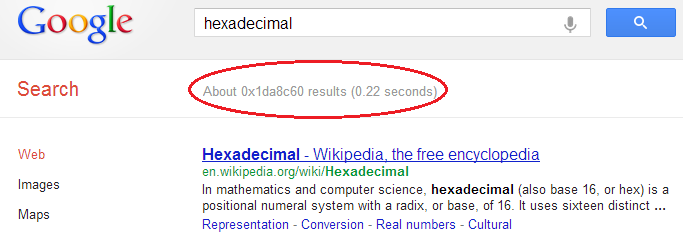
8. Easter Egg Binary, Hexadecimal, Octal Search Results

This is geeky Google Easter Egg which only those can understand who known programming or at least number systems other than decimal like Binary number system, Hexadecimal number system, etc. Search for binaryhexadecimal or octal. It will cause the display of number of search result in the entered number system. For example, this is Google Easter Egg Hexadecimal trick:

9. Google Easter Egg Beatbox

This Easter Egg available in Google Translator. Beat box trick will play beat for you at Google Translator.
Open  Google Translator and set language from German to GermanNow copy and paste this — “pv zk pv pv zk pv zk kz zk pv pv pv zk pv zk zk pzk pzk pvzkpkzvpvzk kkkkkk bsch” (without quotes).
Finally, click listen and enjoy.

10. Google Earth Easter Eggs Giant Bunny

In Google Earth also have lots of easter eggs available as secret locations on Google Map. I am telling you some of those most interesting Google Earth Easter Eggs quickly.

1.    Open Google Earth Search bar
2.    Copy and paste this co-ordinate there:
44°14’39.35″N 7°46’11.53″E
3.    See the epic bunny.


11. Google YouTube Easter Egg – Do the Herlem Shake

It is YouTube Easter Egg in which, YouTube dancing. Open the YouTube.com and Type  “Do the Herlem Shake” (without quotes) in search box and now see that..@

12. Did You Mean Recursion? – Google Easter Egg

"Recursion” means a function calling itself again and again. Google developers have done a trick regarding this word, forming a new geeky Google Easter Egg. Try searching “Recursion” (without quotes) on Google search, Google suggestion will say Did you Mean :- Recursion


Tuesday, 1 July 2014

How To Add Copy To and Move To Option To Right Click Context Menu in Windows ??

Normally, whenever you have to copy or move files one location to another can be a cumbersome process. First you need to right click on the file or folder you wish to copy and select the copy option. Next you need to browse to the destination location and then right click anywhere on it and that select the paste option. However, wouldn’t it be fantastic if you could make the entire process a lot faster and quicker?  There is a simple registry tweak that will add the COPY TO and MOVE TO option to the right context menu of the Windows. As soon as you select either COPY TO or MOVE TO, it will ask you to simply select the destination folder and your job will be done.
Playing around with the Windows Registry can be a dangerous thing to do. Sometimes due to sometimes due to some human error of if something goes wrong while editing the Registry, it is possible for your computer to malfunction. Hence before playing around with the Windows Registry, it may be a good idea to create a backup copy which allows you to recover your computer ever if something goes wrong. But don't worry You can follow each and every steps are carefully and easily. We are try to easy explanation the windows registry tricks. 
This registry tweak can easily he implemented in the following manner:
STEP 1: Click on Start Menu and open run command and type regedit. (WINDOWS + R)


STEP 2: browse the following Registry key:
HKEY_CLASSES_ROOT\AllFilesystemObjects\shellex\ContextMenuHandlers


STEP 3: In the left pane, right click on the ContextMenuHandler key and create a new key called Copy to.


STEP 4: In the right pane, double click on the (Default)string value and enter the following data:
{C2FBB630-2971-11D1-A18C-00C04FD75D13}


STEP 5: Similarly, under the ContextMenuHandler key create a new key called Move to.


STEP 6: In the right pane, double click on the (Default)string value and enter the following data:
{C2FBB630-2971-11D1-A18C-00C04FD75D13}


Step 7: Now when you right click on any File or Folder you will see the option Copy To and Move To being displayed to the right click context menu. Simply select the destination folder and the selected fill will be automatically copied or moved.


How To Add The Encrypt/Decrypt Option to Files and Folders in Winodws ??

Now days, all of us have files on our computer that contain sensitive or private data. Wouldn't it be great if you could encrypt your files easily and quickly by simply right clicking on them?
There is a simple Registry trick available that allow you to add the Encrypt/Decrypt option to the menu that pops up whenever you right click on a file of folder. 
All you need to do is:


STEP 1: Click on Start Menu and open run command and type regedit. (WINDOWS + R)


STEP 2: Browse the Following Registry keys:
HKEY_CURRENT_USER\Software\Microsoft\Windows\CurrentVersion\Explorer\Advanced


STEP 3: In the right pane, create a new DWORD value called EncryptionContextMenu and give it a data value of 1.


STEP 4: Now, whenever you right click on any file of folder you will automatically see the Encrypt option show up in the context menu. Select it and follow instruction on the screen to encrypt the file.


STEP 5: Once the file has been encrypted you will notice that the name of the file appears in green color. Now when you right click on an encrypted file, you will notice that you are shown the decrypt option which allows you to decrypt the file.

As simple as that!

@@ Comment for any type of Queries and Enjoy the Windows Tricks in DIFFTRICK @@

Saturday, 28 June 2014

Best 22 Amazing Facebook Tricks and Tips 2014

Hi. Everyone i am come withe 22 latest Facebook trick and Tips 2014. Facebook is a social networking site that I spend lots of time on. It serves both as a networking and entertainment platform for me. The tricks you shared will sure spice up the time I spend on Facebook.

Hello Friend’s, today I will be sharing some cool Facebook tricks 2014 , tips and tutorials under a single post. I sure you like this post. Diff trick is already posted many Facebook Tricks. And i am put all Facebook posts and trick in one page.


1. Make 5000 Friends in Just One Day:-

How to use the email invitation system on Facebook to get lots of Face book friends. Most people want to get lots of Facebook friends and/or page likes for many reasons. One of these reasons is to get many likes and comments whenever we update our status on Face book.


Get Click on this link and Send Request or make 5000 Friend in one Day.


2. Download Facebook Videos:-

We are see many videos on facebook daily and some of them are really worth downloading, but wait! How to download ? 
You have any facebook video from Go to Downvids and paste the video link. And also select the video format in which you want. 
Another link to download facebook Videos. Click Here


3. Accept All Friend Requests by a Single Click:-

Suppose you get lots or more of requests daily and you tired to accept each and every request? And you don't have to worry. Difftrick are share small script you can easily accept the entire request at once.


Click here to get script for accept all Friends Requests in a Single Click


4. Add All Friends to any Group by a single Click:-

If you try to invite your friends without this method, than you are time wasting, because one by one its take so longer time. But using this trick you can easily invite your all friends by one click with so fast. Click here Add Friend in Group by a One Click.

5. Invite all Friends to a Facebook Event or Page by a Single Click:-

Everyone know that fan page is very important for your business sites, Brand community or many more, Using this you can promote your product via this, Means If you had a product and you wanna promote this via social site than you must create a Facebook fan page.
If you try to invite your friends without this method, Than you are time wasting, because one by one its take so longer time. But using this trick you can get fast Facebook like or easily invite your all friends by one click with so fast. Click here


6. View Private Facebook Profile Picture in Full size:-

Facebook did was to protect the profile pictures with privacy Settings. Well, it’s actually a good thing. Because you’ll be safer from people with bad intentions. But, what if someone, with his entire body as a private profile picture, sent you a friend-request and at the same time, you can’t recognize his name.
Read more to View Full Size Profile Picture.


7. Remove Facebook Advertisements:-

You know the any ads are requiring high bandwidth and more data uses and it is more problem for 2G internet service provider. You have to remove facebook ads from your facebook home using this script Facebook:Cleaner you can easily remove Facebook Ads from your home pages.


8. Post Status in Multiple or All facebook Groups in a Single Click:-

Some person is share new and ides want to post your status or write message in all groups. If you do one by one it’s a time consuming. But we have solve this problem is easily. Click here to post Status in Multiple Group in One Click.


9. How to Know Who Visits Your Facebook Profile:-

How to trace facebook profile visitors. We have to know there is no any limitation of the face book. Read more


10. Block Facebook App Requests & Notifications:-

It’s not the friends fault as most of the games on Facebook require send requests to friends in order to level up or progress further in the game. Eventually these game and app requests will keep piling up and a better option would be to disable these notifications. Click Here


11. Auto Post Birthday Wishes on Facebook Friend's Wall:- 

One may miss wishing your friend on Facebook by being away from it or not logging in to Facebook. So use the application to wish your friend even though if you don't open Facebook..! Read more


12. Convert Your Personal Facebook Account Profile into Business/Fan Page:-

I am discussing still using a personal Facebook profile to promote your business?
Absolutely yes, Facebook introduce migration feature because Facebook account have limitation of 5000 friends. So is you are using Facebook for business purpose or if you are big star or famous personality. Read more


13. Send Message on Facebook Even if You Are Blocked:- 

Hey, someone blocked you on Facebook. Don't worry you can send him message even if you are blocked. Click here@


14. Send Friend Request Even If you are Blocked:-

Friend request is blocked, if your pending request is reached to a limit. And you are blocked for sending requests for 3, 5 days or even for a month. Never mind, I am gonna tell you a working trick for sending request even when you are blocked. Read More@


15. How Much Time You Have Wasted on Facebook:-

TIME has created a calculator that determines how much of your precious life you've lost to Facebook. The app uses time stamps from every post in your feed including your first one, where it will then estimate the date you created the profile. Check It@


16. Backup you’re All Facebook Data easily:-

Backup all your face book data. Image, videos, link, chat info and comment any things you have posted in your facebook account, it process is start from your beginning from your facebook and at that time. Follow this link.


17. Post an Empty Status or Comment:-

First Login to your facebook account. And click on status and enter the Put below following code and press enter. Now See the post.

@[2:2: ] 


18. See who is online when you are offline:-

Sometimes it becomes necessary to check who is online which offline is. Use the below application to know who are online while you are offline. Check It@


19. See Online Friends in Facebook Chat being Offline:-

You see the person is online are not in offline mode. I think you must have failed. Do you want to know how can it be done? Click Here a way to know who’s online when you are in offline mode.


20. Make Funny Facebook Walls:-

Make amazing kind of facebook funny walls posts. Add your own images, friends etc. You can post it on your own wall after making them.
Make your own funny walls from HERE.


21. Download Photo Albums of any PAGE, GROUP or FRIEND:-

Well this trick is really helpful. By this you can easily download any facebook album or photo of anyone in your list. 
The best thing is you can even download page albums and groups album/photos as well. Start downloading.


22. Facebook Chat on Firefox Sidebar:-

If you are using Firefox, you can place the Facebook Chat at the sidebar. Click Here@


@@Thanks##I hope you liked them all. I try to my best, If you wanna like us on facebook then click here. Any kind of query or question for this tutorial comment below. And if you like this post share it to your friends. I am come with new facebook trick for you in future... #Thanks.