Sunday, 24 August 2014

How to Increase Your Followers on Google +

After Facebook, Google + fastest growing Social Networks. It is also consider into Google search engine, and your search result could depend on it. It is best network for content marketers.


Google+ is just like any other social network. In order to be social, you need to have friends. You need other people on that social network to interact with, people who are active members of that social network. If they don’t log in on a regular basis and keep their profile active, they can’t interact with you. In order to build up your social media presence, you need to be active, as well. This gives you targeted followers.  All you have to do is just some 10-15 minutes research.


Let’s see how to Increase your followers on Google +:-
STEP 1:- Open you Google Plus Account.
STEP 2:- Go ahead and fill your profile picture and other field.
STEP 3:- Search for #SharedCircles. 


So many circle are open in your home page, now select any circle and click Add people.

STEP 4:- You can create a new circle or add them to any of your exisiting circles. I recommend making a new circle everytime. 


After you create the circle, you will start getting followers. Here's a snap showing my 1 day Google+ Notifications. 80% of the notifications I get are of followers. 


For More Tricks. Keep Visiting Difftrick.

Saturday, 26 July 2014

How To Use Your Phone as A Wireless CCTV Camera??

Have an old android mobile (or even a tablet) and you want to use that as CCTV camera at home? It is possible with only 2 apps or software. I think everybody it loved it. It is also required Android mobile. Because this trick is based on android apps via Bluetooth and Wi-Fi connection. And you need PC or laptop for needed. You have also record the Video from Webcam on your receiver. It is worked on every android mobile phone.


There are many software available in market in android, iOS and Nokia market but it required more and more apps for configuration with PC and Mobile phone.

In many so many apps available for this trick but I found free apps for it, easy to handle it.


Download Important Software:
First you have download and install Smart Cam on your PC or Computer. Download Link.
Now, you install Smart cam in your phone. Download Link.

Connect Mobile Cam via Bluetooth:
STEP 1: Open Smart cam in your Computer. On PC set Bluetooth on setting menu in smart cam.


STEP 2: Now Start Smart Cam in your mobile. Set Bluetooth in setting on app and select your PC as a receiver.


STEP 3: Wow, After Completed Above Steps, then See Videos on Receiver. Click on the Start Recording for Record the Video.


Connect Mobile Cam via Wifi:-

STEP 1: Open Smart cam in your Computer. On PC set Bluetooth on setting menu in smart cam.

STEP 2: Now Start Smart Cam in your mobile. Set Bluetooth in setting on app and select your PC as a receiver.

STEP 3: Connect your PC with WiFi.

STEP 4: Set same port on PC app as you set on mobile.

STEP 5: After Completed Above Steps, then See Videos on Receiver. Click on the Start Recording for Record the Video.
You done it...@@

Friday, 25 July 2014

Stop receiving notifications/requests for games such as Candy Crush, Farme Vill and others?

This mean you’ve likely gotten invitation to play a game or connect with a app that You’re. Then the user can choose to stop receiving notification from that apps or games. I have found the way to block requests on a Mobile or computer device. 
STEP 1:- Login to your Facebook Account.
STEP 2:- Open the Apps request center. Click here.
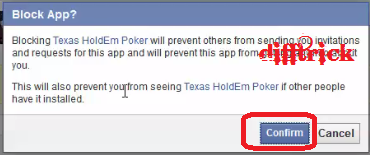
STEP 3:- Now see app you want to block Facebook game requests for and click the “X.” See below image I am block Texas HoldEm Poker game request.


STEP 4:- Then click on the Block Texas HoldEm Poker game. 


Now click on the Confirm Button.

Another Option for Block games notification Requests:-
STEP 1:- Login your Facebook account and click on the Setting option.
 STEP 2:- Then Click on Apps from left sidebar.


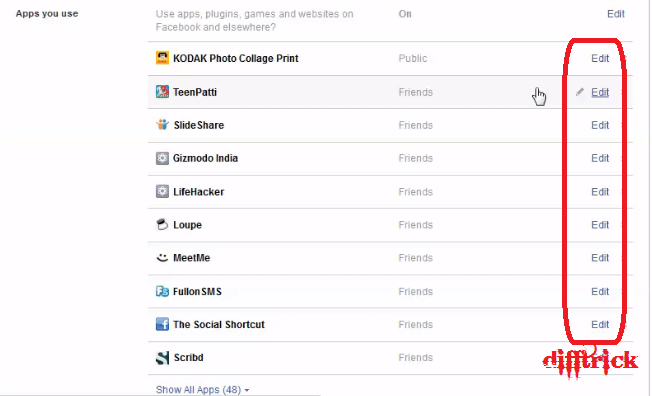
STEP 3:- Now find apps and click on the Edit option.
  
STEP 4:- Then click on the Never option. (See images for more details)

For Mobile Users follow these simple steps:-
STEP 1:- Open your Facebook apps on your mobile.
STEP 2:- Click on the more option are show in bottom. And click on the Setting option.
STEP 3:- Now UN Check the Application Request.
Wow you done it@

@@Thanks###. Enjoy the facebook trick in difftrick.

Thursday, 24 July 2014

The Hacker Team is working in Google -Under in Project Zero

Google’s new Project Zero team adds some welcome muscle in the fight against cyber crime and could also lead to better privacy for all, making it harder for intelligence agencies to spy. I think are you shocked. But it is true. Google hire a hacker Team for a Project Zero.George Hotz is leader of project zero, and he is expert for Sony's PlayStation 3 and Apple's iPhone.


The 24-year-old also known as Geohot hacked into the PlayStation 3 in order to install alternate operating system software, with the intention of playing pirated games. Hotz was then subsequently sued by Sony, although the matter was settled outside the courtroom. The hacker is also known for unlocking Apple's iPhone. Now, after a brief stint at Facebook several years ago, Hotz has found a home with Google, according to the BBC.

Google's Project Zero aims to reduce the threat that zero-day attacks represent by funding vulnerability research and hiring top security specialists and hackers. The hire of Hotz, therefore, is hardly a surprise — as these types of projects need people that can think like cyber attackers, as well as be talented in their own right, in order to thwart them.

Google's move to set up Project Zero is very welcome. The infrastructure we run our businesses and our lives on is showing its fragile nature as each new, successful attack is disclosed. Unfortunately, we all share significant risks, not least because IT tends towards ‘monoculture,’ with only a few major pieces of hardware and software being used most of the time.

What is Project Zero?

 It is initiative by Google Team, for a Top security Researcher that will research on the security mail ware, trapdoor and others threats are at time. And another the project will be guide by Chris Evans, leading Google Chrome Security Team.


The main purpose of Project Team and Google are finding security loopholes in the software and also work on the zero days attacks and few number of user attacks by it. It is not research on Google products it research for Security purpose on their software’s and application.